Stoch BB Reversal Smart Mode: 15-Second Adaptive Auto Trading on Pocket Option
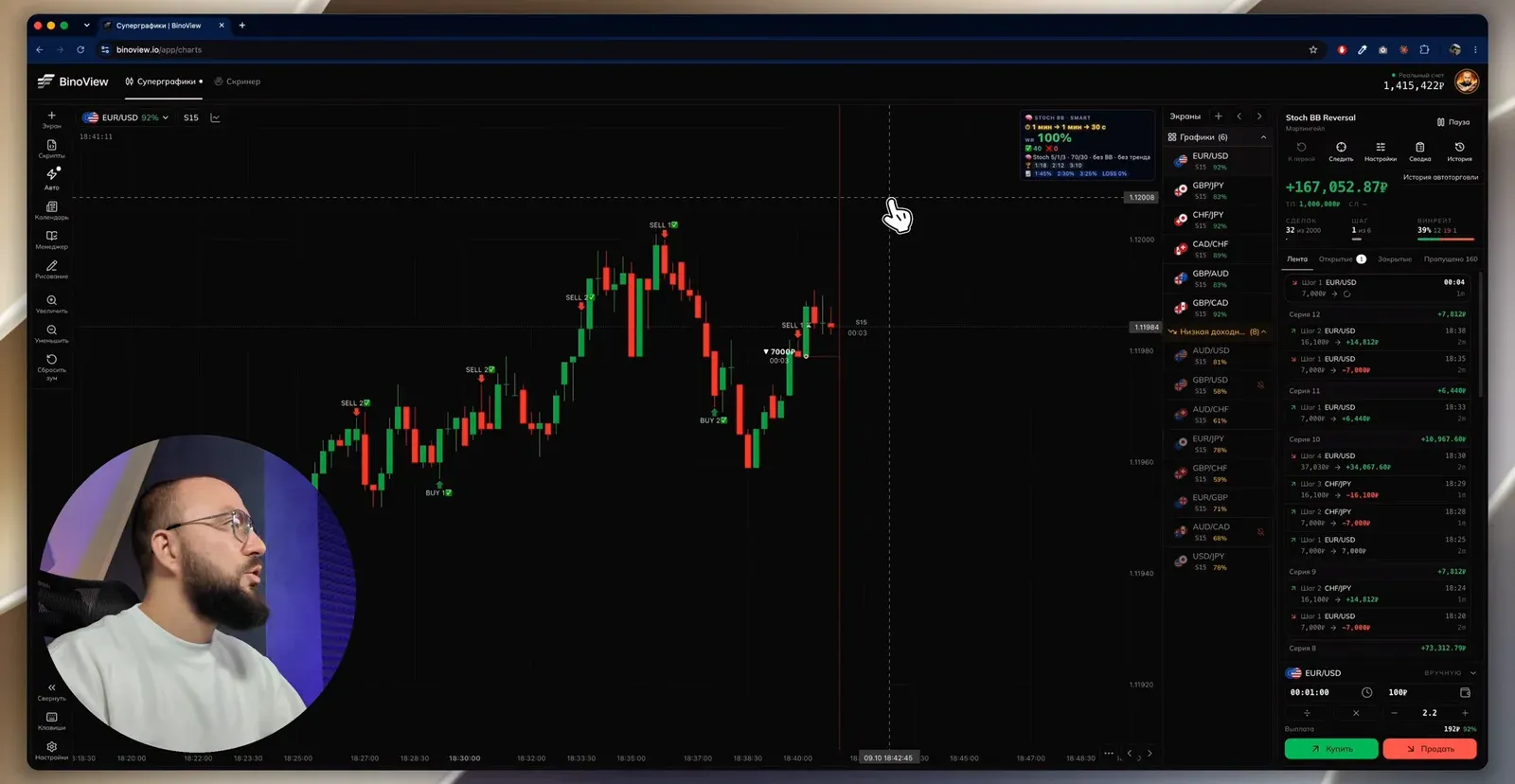
Auto trading with the Stoch BB Reversal bot with smart mode on: the bot picks the expiration for the first trade and the recoveries on each asset by itself and recalculates it every minute. The script and Auto window settings from the screen: S15 timeframe, exchange assets, martingale with coefficient 2.3 over six steps, expiration source from the script, recoveries on the same pair. The terminal update with an event feed and on-the-fly settings changes, the session history with an overnight loss of −$2,073 and a recording that ends at +174,304 ₽ in two hours.
Contents
The Stoch BB Reversal bot has already been covered in the manual strategy on Bollinger Bands, Stochastic and EMA 50: there it highlighted setups on the 1-minute chart. In this video it works in Auto mode with smart mode enabled: it decides itself how long to open the first trade and each recovery for, and recalculates the choice every minute. Below are the script and auto-trading settings from the screen, what has changed in the terminal, and the session history over three days, including an overnight loss.
What smart mode is
A regular signal bot opens a trade for the fixed expiration you set. In smart mode Stoch BB Reversal picks the expiration for each asset by itself: for the first trade and separately for the recoveries. In the video on EUR/USD the first trade runs for 2 minutes and the recovery for 2 minutes, while on another asset the bot may choose 1 minute and 30 seconds. The options range up to several minutes.
The selection is statistical: the bot takes a window of the last 400 candles, runs through the expiration options (four of them in the settings) and looks for the combination with the target win rate. Recalculation every minute. An important detail: the new parameters apply only from the next series. If the first trade opened for 1 minute under the old calculation, its recovery will also run for 1 minute, and only the new series starts with the recalculated 2 minutes.
Script settings
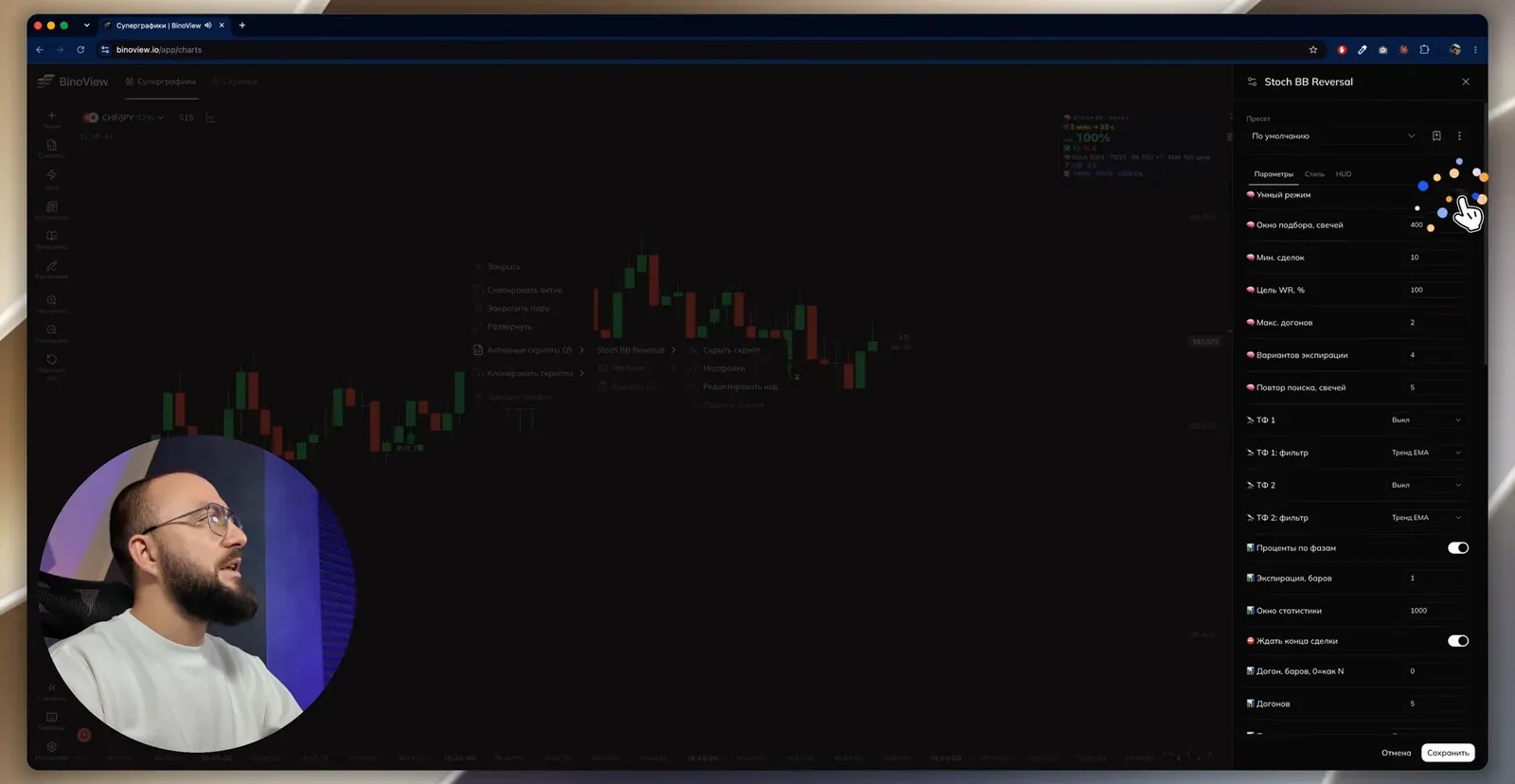
The settings open via a right click on the chart → "Active scripts" → Stoch BB Reversal → "Settings". Values from the video:
| Parameter | Value | What it does |
|---|---|---|
| Smart mode | on | automatic expiration selection |
| Selection window, candles | 400 | how much history the bot analyses |
| Min. trades | 10 | fewer trades in the window and the statistics are not counted |
| Target WR, % | 100 | the target win rate for selection |
| Max. recoveries | 2 | how many recoveries the expiration is picked for |
| Expiration options | 4 | how many expirations it runs through |
| Search repeat, candles | 5 | how often to recalculate |
| TF 1, TF 2 | off | higher-timeframe filters disabled |
| TF filter | EMA trend | the filter type, if enabled |
| Percentages by phase | on | statistics by series phase |
| Expiration, bars | 1 | the base expiration without smart mode |
| Statistics window | 1000 | for the WR card on the chart |
| Wait for trade end | on | no new signal is given while a trade is open |
| Recovery, bars (0 = same as N) | 0 | recovery expiration same as the first trade |
| Recoveries | 5 | recovery limit in the statistics card |
Stoch BB Reversal and other tools — in BinoView Supercharts
Auto-trading settings
Chart timeframe S15, 14 screens open, exchange assets only: no OTC, which on a Friday evening leaves five or six pairs with a normal payout. The Auto window:
| Parameter | Value from the video | Comment |
|---|---|---|
| Account | real, 1,430,234 ₽ | |
| Strategy | martingale | |
| First trade | 7,000 ₽ | $1 in the demo configuration |
| Coefficient | 2.3 | |
| Maximum steps | 6 | the overnight run with three recoveries ended in a loss |
| Continue after a lost series | on | |
| Trade opening | on the next candle | set only at launch |
| Expiration source | from the script | required for smart mode, set only at launch |
| Min. payout | 85% | |
| Maximum trades | 2,000 | |
| Take-profit | 1,000,000 ₽ | effectively does not limit the session |
| Stop-loss | off | |
| Recover on the same pair | on, maximum 2 | the bot's calculation is for the first trade plus two recoveries |
| Telegram notifications | on | to stop the bot from a smartphone |
| Auto-switch low-payout pairs | on |
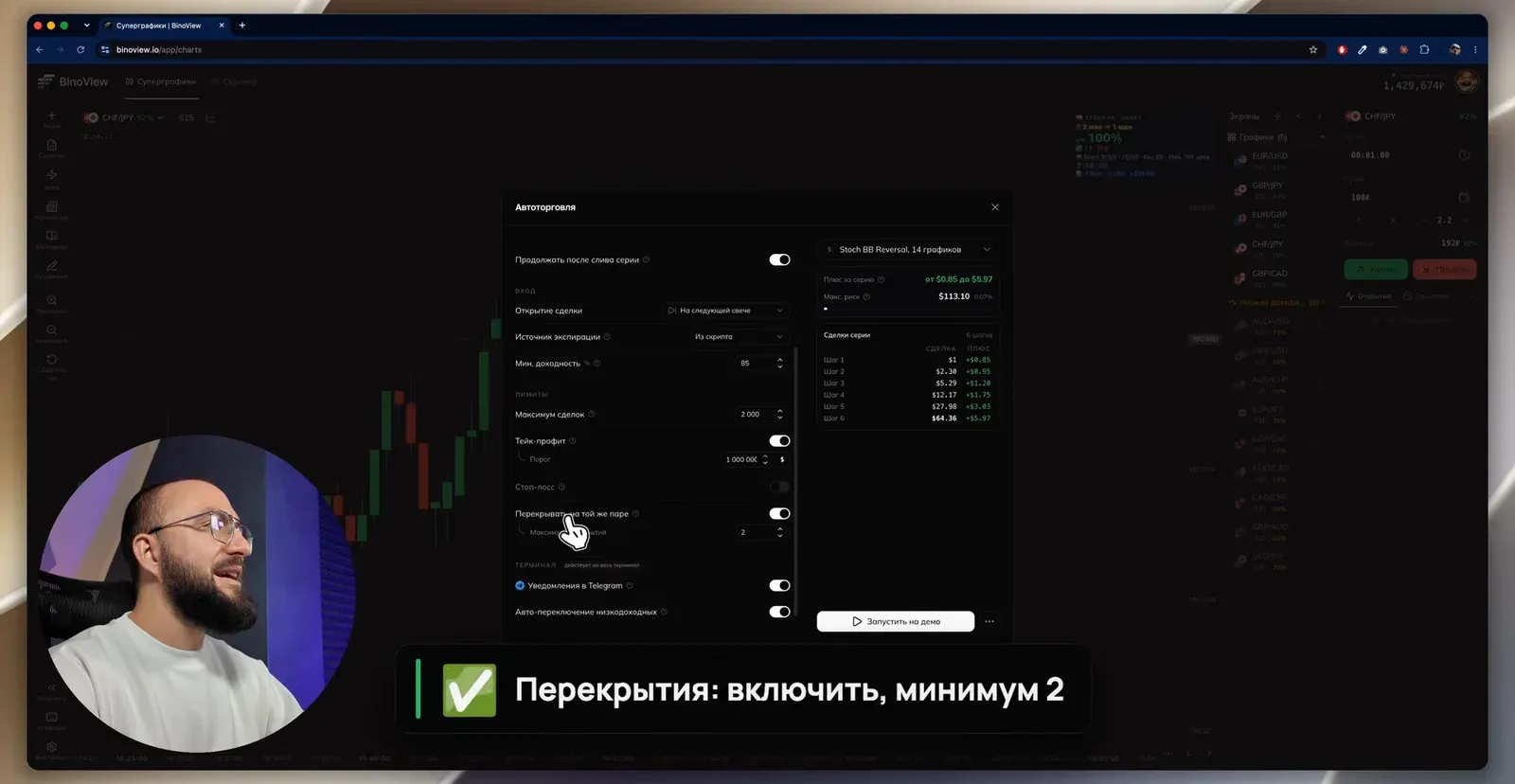
Two parameters are singled out in the video: "Expiration source: from the script" and "Recover on the same pair: on, minimum 2". Without the first, smart mode does not work; without the second, the bot's calculation diverges from what auto trading does.
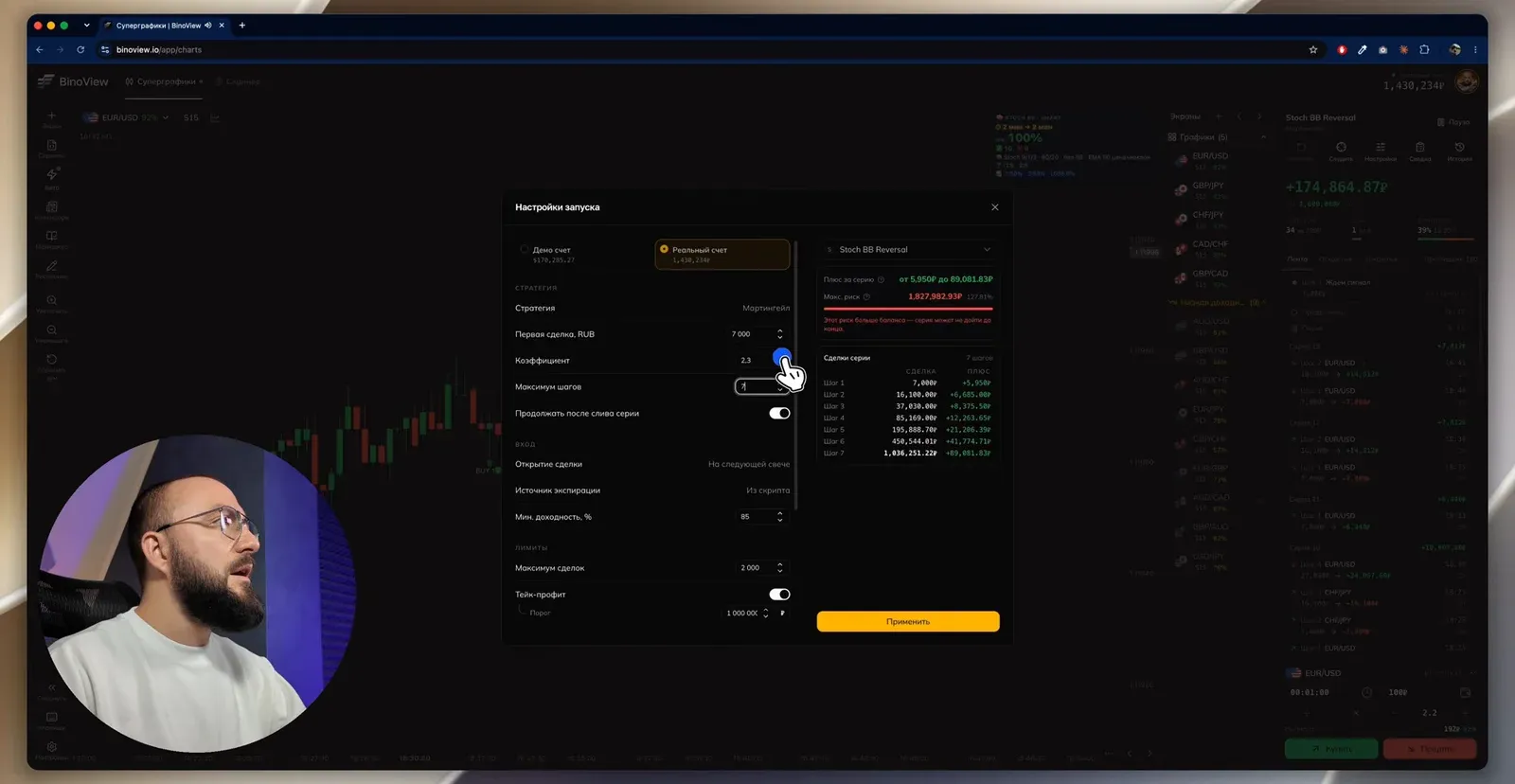
What a series costs at coefficient 2.3 and a 7,000 ₽ first trade is shown by the terminal in the "Series trades" table. During the recording seven steps are set for demonstration:
| Step | Trade size | Profit when the series closes |
|---|---|---|
| 1 | 7,000 ₽ | +5,950 ₽ |
| 2 | 16,100 ₽ | +6,685 ₽ |
| 3 | 37,030 ₽ | +8,375.50 ₽ |
| 4 | 85,169 ₽ | +12,263.65 ₽ |
| 5 | 195,888.70 ₽ | +21,206.35 ₽ |
| 6 | 450,544.01 ₽ | +41,774.71 ₽ |
| 7 | 1,036,251.22 ₽ | +89,081.83 ₽ |
The terminal calculates the maximum risk of seven steps itself: 1,827,982.93 ₽, that is 127.81% of the balance, with a red warning that "the risk exceeds the balance, the series may not reach the end". With six steps the series risk is 791,731.71 ₽, a little over half the deposit. You can build the same table for your own bankroll in the martingale calculator.
What has changed in the terminal
Auto mode itself works as before; what has changed is the management of a running session.
- Event feed. Pause, resume, settings changes and every trade are shown in the feed on the right with a timestamp.
- Settings on the fly. Previously, to change the coefficient you had to stop the bot and launch it again. Now open the settings while it runs, change them and click "Apply". The new values take effect from the next series: the current series plays out on the old ones so as not to break the bot's logic in the middle of recoveries. The exceptions are trade opening and the expiration source, which are set only at launch.
- "To first trade". Forcibly closes the current series: the bot books its losses and starts a new one from the first amount. Handy if you decided to stop at two losses.
- "Follow". The terminal switches the screen itself to the asset where a trade is open. Switch it off and you stay on one chart while the bot works in the background.
- "Summary". A card with all the session settings that can be shared as a screenshot.
- "Share configuration" and "Apply by code". The three dots in the auto-trading window. The code pulls in the script with all its settings: all that remains is to switch the account type and the first trade amount. The code is pasted in the auto-trading settings, not in the bot settings.
Session history
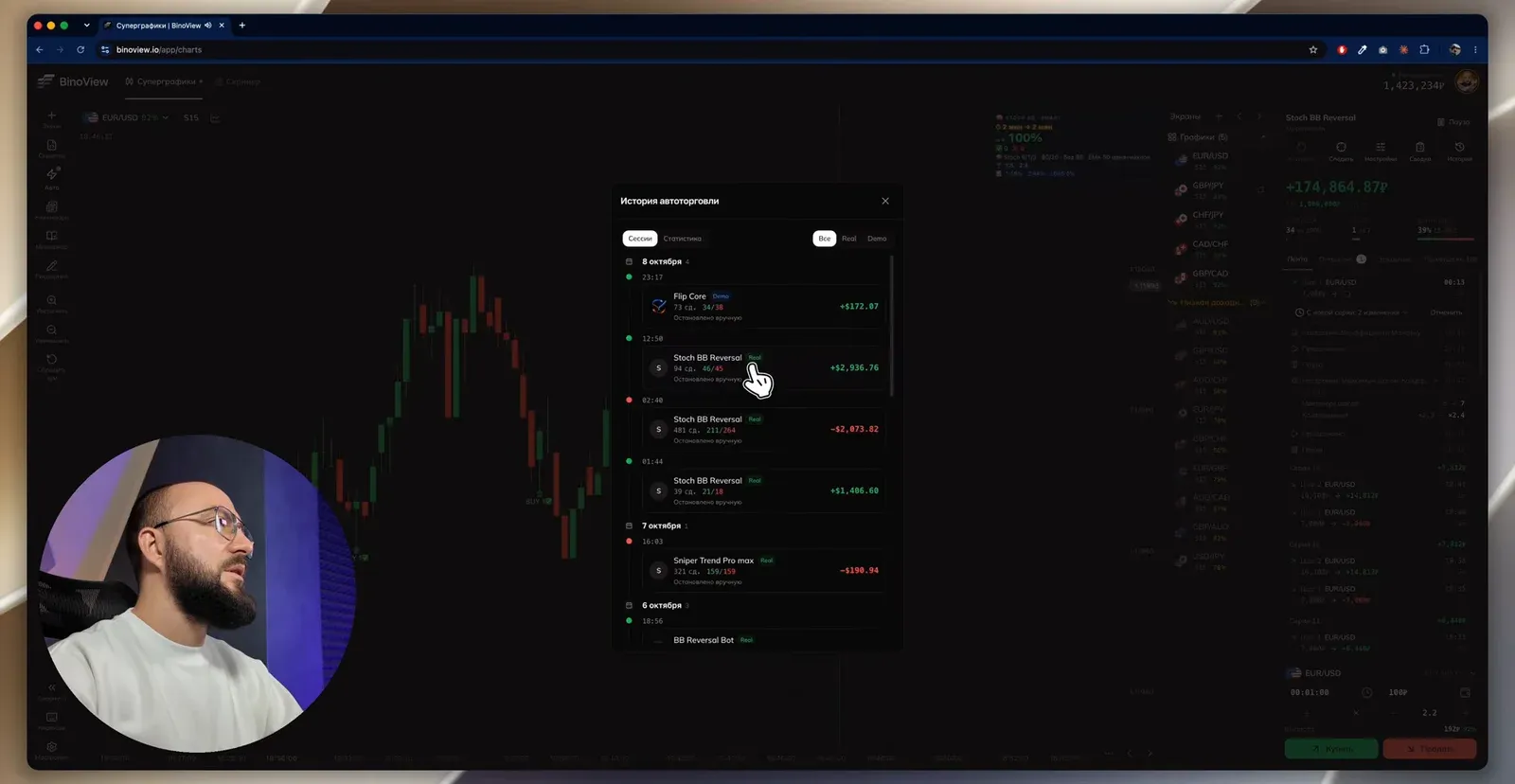
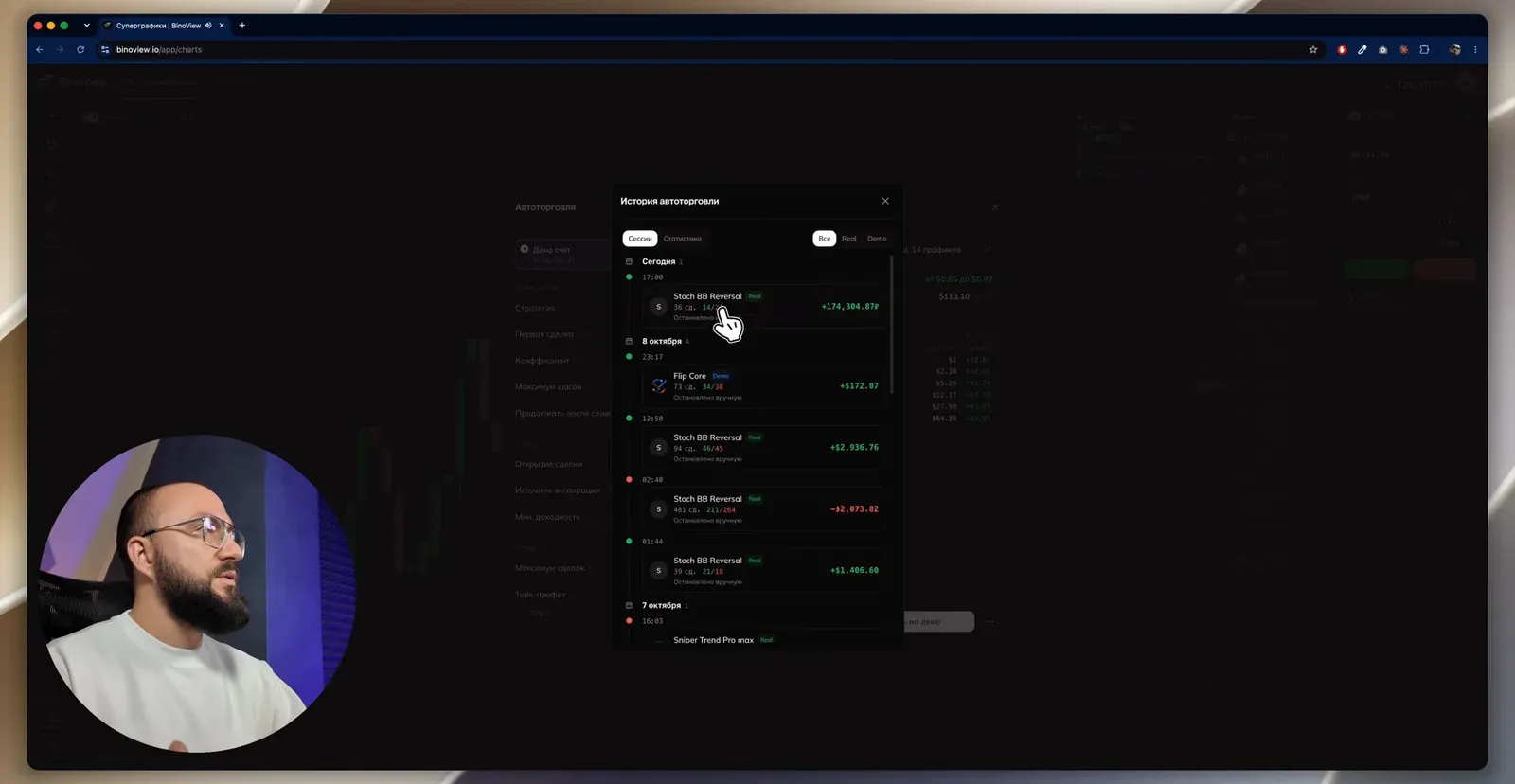
The video was shot on Friday 10 October; three days of auto-trading history are visible on screen.
| Date | Session | Trades | Result |
|---|---|---|---|
| 7 October | Sniper Trend Pro max, real account | 321 | −$190.94 |
| 8 October, 01:44 | Stoch BB Reversal, real | 39 | +$1,406.60 |
| 8 October, 02:40 | Stoch BB Reversal, real, overnight run | 481 | −$2,073.82 |
| 8 October, 12:50 | Stoch BB Reversal, real | 94 | +$2,936.76 |
| 10 October, from 17:00 | Stoch BB Reversal, real, about two hours | 36 | +174,304.87 ₽ |
The overnight loss is analysed in the video as a settings mistake: the bot was left overnight with three recoveries and a return to the first amount after a series, ran for almost ten hours and closed the day with a loss of $2,073. After that the launches were supervised, with a six-step martingale, and the performance became noticeably better.
The 10 October recording also shows the other side of six steps. One series had five losses in a row, and the sixth trade opened at 450,000 ₽. It closed as a win, the series brought about 73,000 ₽ and made most of the day's profit. Had the sixth closed as a loss, the series would have cost more than 790,000 ₽. The video itself ends at +174,304.87 ₽ over 36 trades: the bot is stopped by hand after another loss, because the result for two hours was judged sufficient.
These are the results of specific sessions, not the strategy's return. On a 15-second chart a run of five losses is an ordinary event, and everything comes down to whether the bankroll is enough for the sixth step and whether there is enough discipline to stop earlier. How to cap the day's losses in advance is covered in the articles on the daily loss limit and drawdown.
FAQ
What does smart mode do in Stoch BB Reversal?
The bot runs through expiration options for the first trade and for each recovery over a window of 400 candles and picks the combination with the best statistics on the current asset. The first trade may open for 2 minutes and the recovery for 30 seconds, or the other way round on another asset. The recalculation runs every minute, and the new parameters apply from the next series.
Why must the expiration source in the Auto window be 'From the script'?
Otherwise smart mode does not work: auto trading will open every trade with the single expiration set by hand, and the bot loses its adaptivity. This setting and 'Trade opening: on the next candle' are set only at launch; the other parameters can be changed on the fly.
Why enable recovery on the same pair with a minimum of 2?
The bot's calculation is built around the combination 'first trade plus two recoveries' on one asset: the expiration is picked precisely for such a series. If the recoveries move to another asset, the chosen parameters no longer match the chart. That is why the switch is on in the auto-trading settings and the number is 2.