Close Fade 1M Bot Signals on a Smartphone: a Manual Binary Options Strategy
Manual binary options trading from a phone using Close Fade 1M bot signals: the volume filter setting, the confirmed-candle rule, picking signals by first-attempt win rate, one recovery trade per asset and a breakdown of six real-account trades from the video.
Contents
The video was recorded on holiday, from a smartphone and on a real account. Nick opens trades by hand on signals from the Close Fade 1M bot, the same one he runs in auto trading. He barely looks at levels or trend: everything rests on one signal-confirmation rule and on recovery-trade discipline. Below are the bot settings, the entry rules and a breakdown of all six trades from the video.
How the bot works
Close Fade 1M does not trade classic candlestick patterns but statistical regularities of the candle close. Judging by the settings, a signal appears when a candle closes right at the edge of its range: the "Close edge zone" parameter defaults to 0.1, the outer 10% of the candle's range. The bot counts on such a move fading: a close at the top edge gives a sell signal, a close at the bottom edge a buy. You do not have to verify the pattern by eye; the bot computes the statistics on history and shows them in its card.
Timeframe M1, expiration 1 minute.
Settings from the video
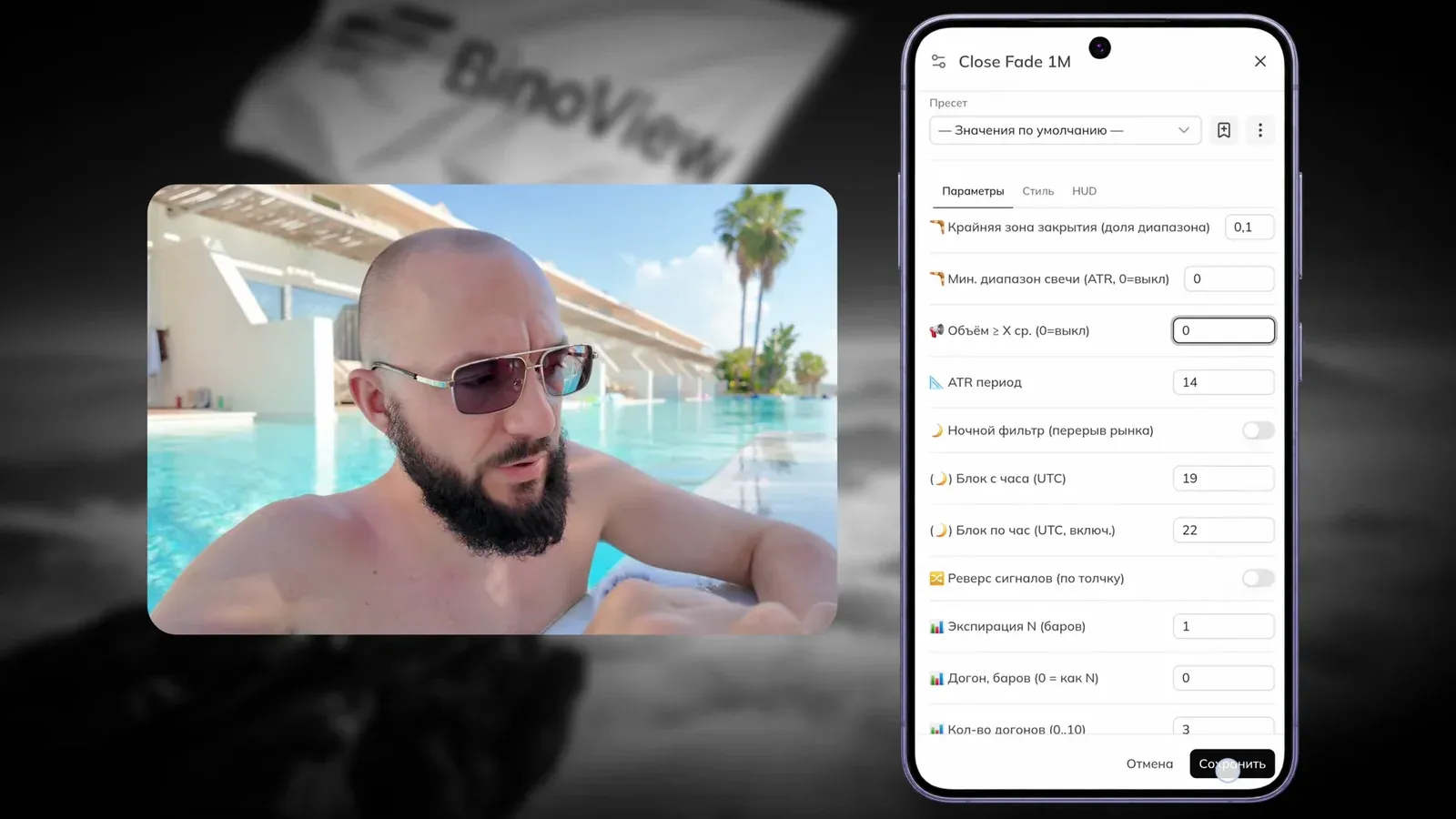
The author changes one parameter: the volume filter. At its default value the bot screens out, in his words, about 95% of signals. The video needs many setups in a short time, so the filter is set to zero.
| Parameter | Value | Note |
|---|---|---|
| Close edge zone (share of range) | 0.1 | default |
| Min. candle range (ATR) | 0 | off |
| Volume ≥ X avg. | 0 (default 1.5) | the author's only change: more signals, lower quality |
| ATR period | 14 | default |
| Night filter | off | |
| Blocked hours (UTC) | 19–22 | a preset pause window |
| Expiration N (bars) | 1 | one 1-minute candle |
| Recovery, bars | 0 | recovery trade on the same expiration |
| Number of recovery steps | 3 | depth of the card statistics, not an entry limit |
On a smartphone the settings open with a long press on the chart: "Active scripts" → Close Fade 1M → "Settings".
Close Fade 1M and other tools — in BinoView Supercharts
How to read the card
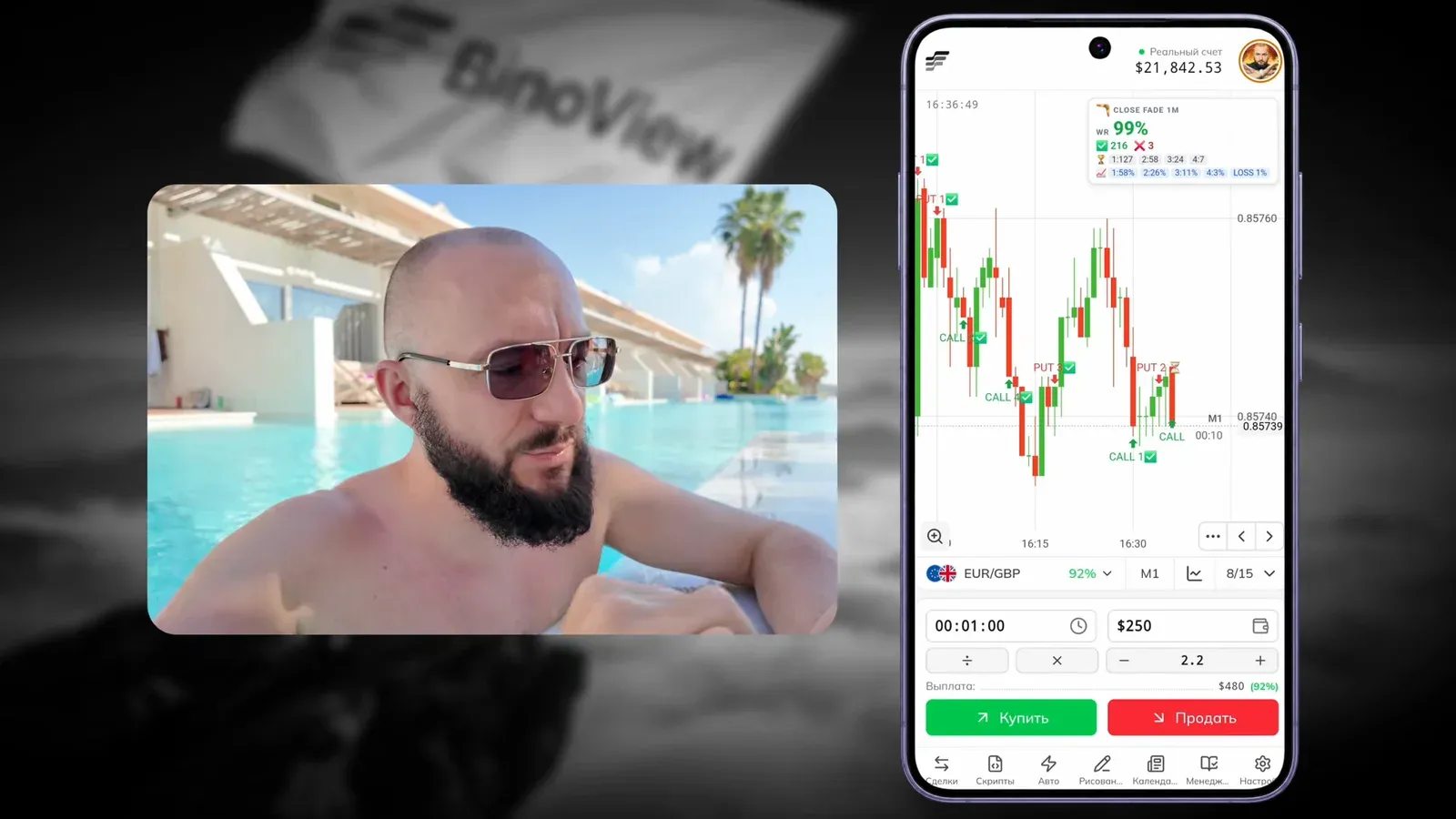
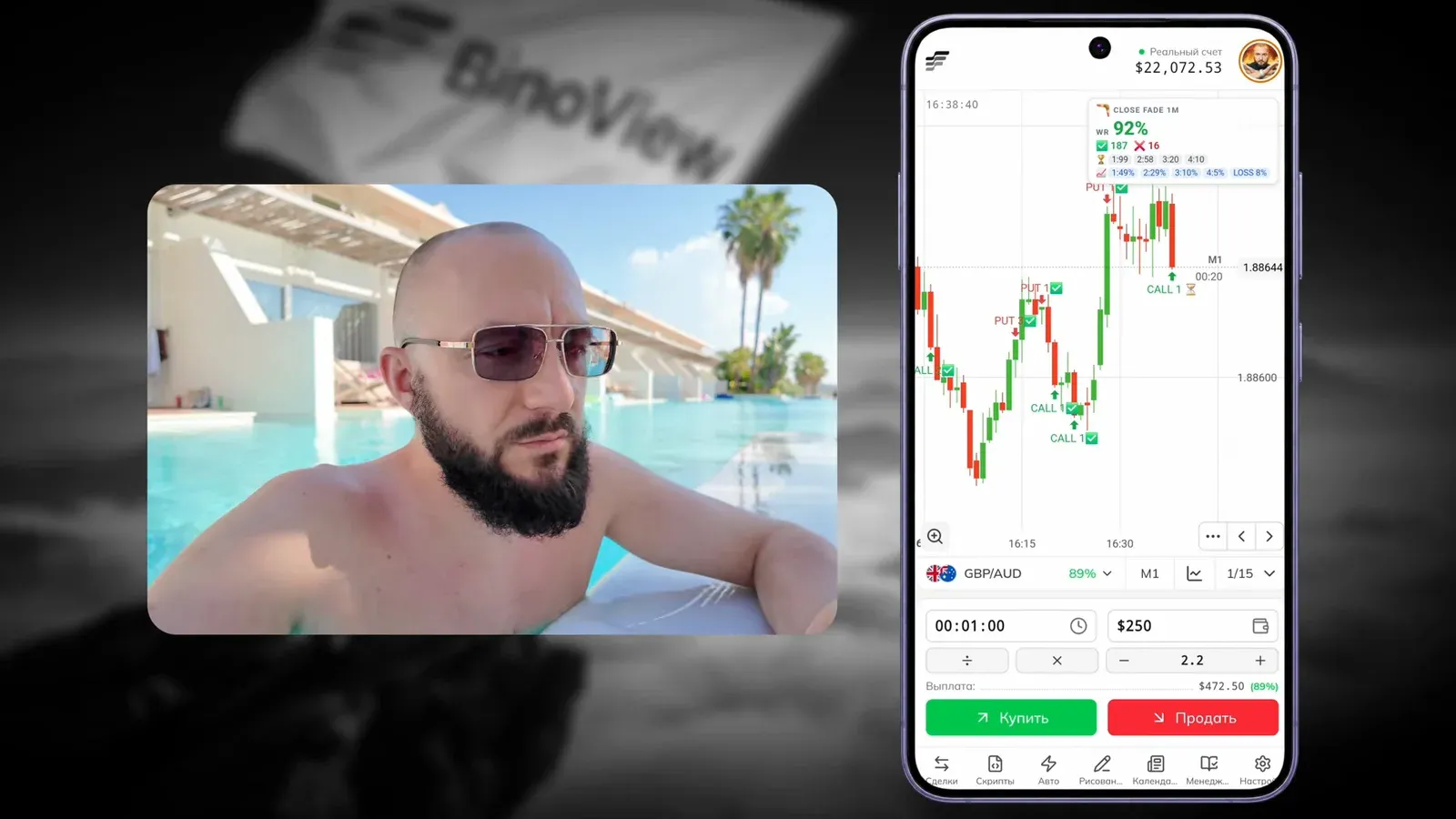
The bot keeps a statistics card in the corner of the chart. The author checks it before every entry.
- WR — the overall win rate including recovery trades. In the video, 91–99%.
- ✓ and ✗ — how many setups closed as wins and losses.
- 1:127, 2:58, 3:24, 4:7 — how many wins came on the first attempt, the second (after one recovery trade), the third and the fourth.
- The percentages row — the calculated profit at each step and the loss if the series fails.
The key number for the author is the share of first-attempt wins. On EUR/GBP it is 127 out of 216, about 58%: the trade is worth taking. On another asset the first attempt showed 49%, and the author skips such a signal: at "50/50" there is no point entering, except with a recovery trade prepared in advance.
Entry rules
| Buy | Sell | |
|---|---|---|
| Signal | CALL mark below the candle | PUT mark above the candle |
| Confirmation | the signal candle closed and the mark stayed | same |
| Entry | at the open of the next candle, 1-minute expiration | same |
| Filter | share of first-attempt wins well above 50% | same |
| Recovery | one per asset, multiplier 2.2; the next only on a new signal | same |
The main rule is about the forming candle. While a candle is active, the bot recalculates the pattern on every tick, and the mark can disappear. That is not repainting but normal operation: a signal is considered cancelled if it is gone after the candle closes. Enter only when a new candle has opened and the mark on the previous one is still there.
Two more limits from the video: do not open a trade when the asset's payout has dropped (the terminal warns you itself), and be ready for the trend to break when there is major news on the pair's currencies.
The session from the video, trade by trade
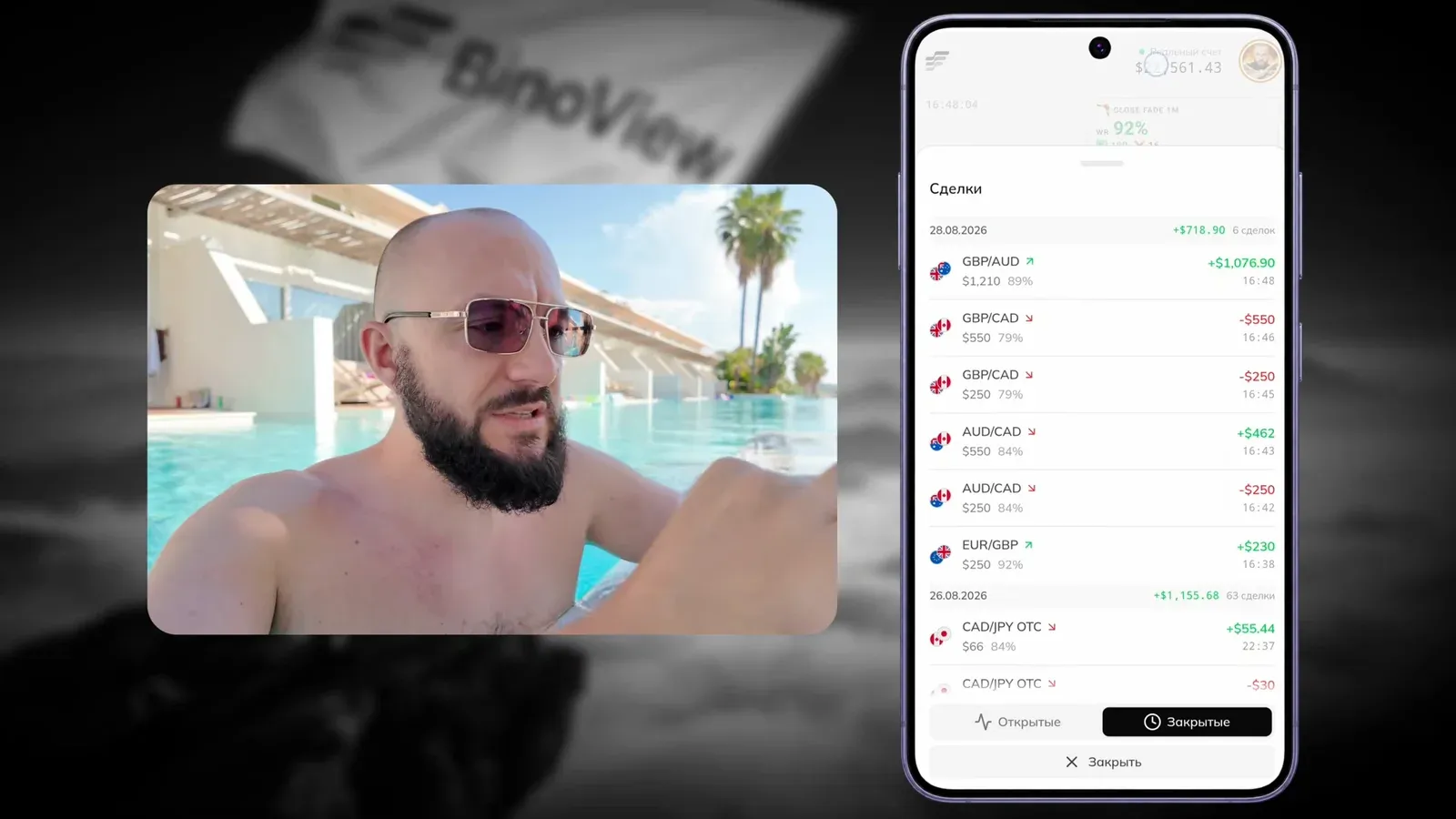
Trades were opened at $250 with a deposit of about $22,000. The list of closed trades at the end of the video:
- EUR/GBP, buy $250. The signal vanished on the active candle and came back after the close; entry with the new candle. Win, +$230.
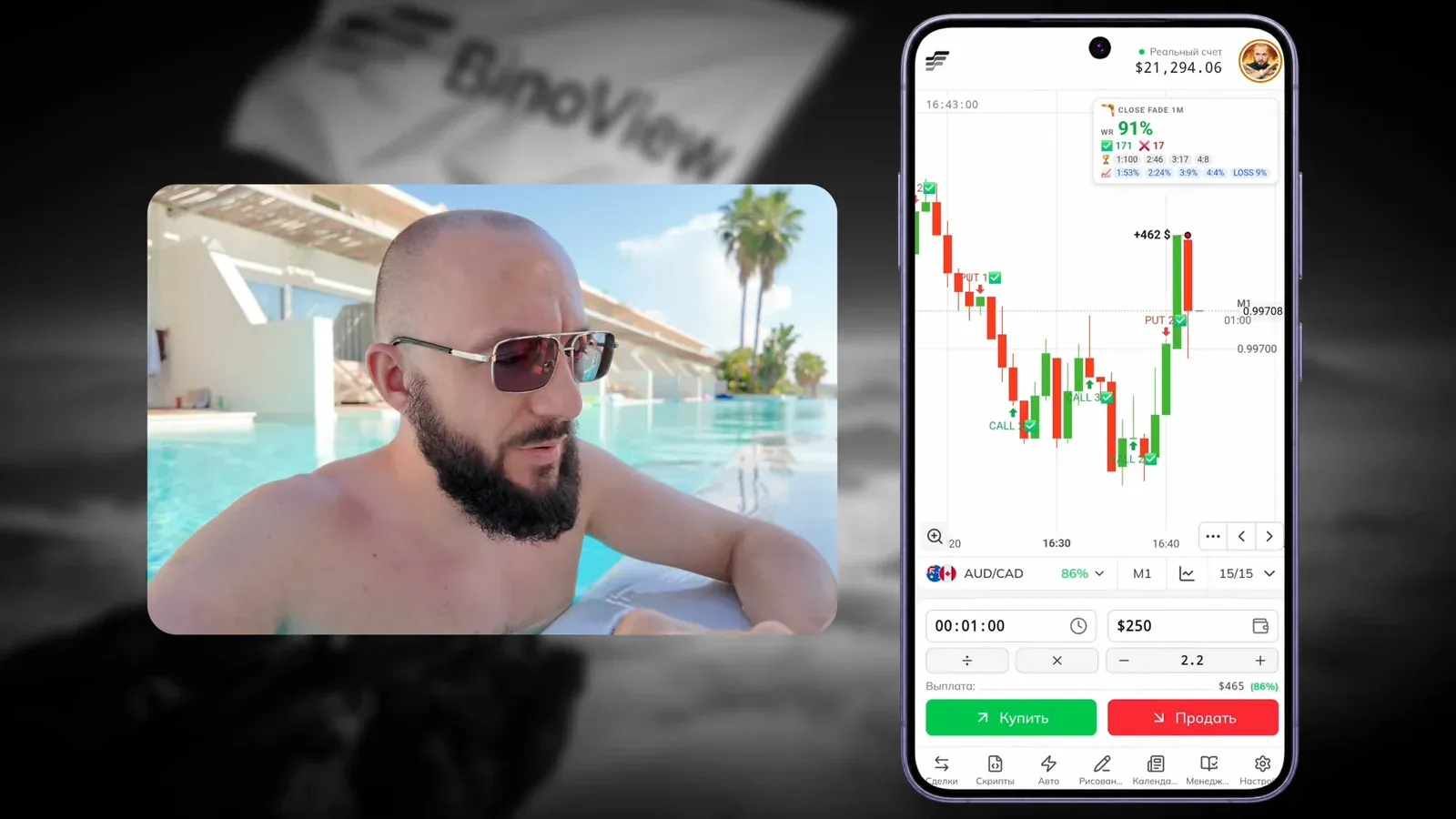
- AUD/CAD, sell $250 amid news on the Canadian dollar. Loss.
- AUD/CAD, recovery trade $550 on the same signal. Win, +$462.
- GBP/CAD, sell $250, a late entry as the candles slowed down. Loss.
- GBP/CAD, recovery trade $550. Loss: the author himself notices higher lows, a reversal up that the signal was going against.
- GBP/AUD, buy $1,210 on a new signal on another asset. Win, +$1,076.90.
The result of the recording: 6 trades, 3 wins and 3 losses, +$718.90. A 50% hit rate, positive thanks to the recovery trades. The author says it plainly: the profit came from recovery-trade discipline, not entry precision.
Manual or auto mode
The author believes this strategy suits auto trading better: signals can vanish in the last second, and the bot reacts faster than a hand. The bot too sometimes enters a setup that is cancelled right away, and that is part of the process rather than a bug. Manual mode is slower but forces you to think: pick setups, check the card and the news. That is exactly why the video uses manual mode, to show the selection logic.
Before you test it
- Demo first. The author repeats it: understand what the bot does before moving to a real account. Some beginners "just take trades on the bot" without knowing why.
- The volume filter is a trade-off. Zero gives many signals for a quick recording; for everyday trading compare both settings on demo.
- News. Any major event on the pair's currencies moves price, and the trend can break at any moment.
- One recovery trade per asset. The next only on a new signal.
FAQ
Why doesn't a signal on a forming candle count?
Until the candle closes, the bot recalculates the pattern on every tick, so the mark can appear and vanish. A signal counts only if it is still there after the candle closes; the entry is at the open of the next one.
Why zero out the volume filter if it screens out weak signals?
For the video the author needs many setups in a short time. At the default value the filter removes most signals but keeps the more reliable ones. For everyday trading the author suggests comparing both settings on a demo account first.
Can Close Fade 1M run in auto mode instead of manual entries?
Yes. The author himself calls auto trading the best fit for this bot: signals can disappear in the last second, and the bot reacts faster than a hand. Manual mode in the video was chosen to show the selection logic.